 Talkfirst
Short answer. With the Talkfirst connector you ask the agent for a short lesson, it writes a script of scenes and the server voices and assembles it in the background, in about 15 seconds for eight scenes. The lesson then waits for you in the Lessons tab of the app, to listen to, watch with slides or read; for English there is no ready-made library, lessons are built on request.
An AI chat explains well, but its explanations live in a chat window: you have to sit and read them. Many people learn better by ear, on a walk, in the car, while cooking. With Talkfirst connected, the agent can turn an explanation into a short audio lesson that you listen to later, from your phone.
How to connect the connector is in the section overview. Here is the lessons block in detail.
How a lesson is built
You ask: “make a short lesson about …”. The agent reads the help on lessons and writes a script. A script is a sequence of scenes:
- explanations in the language you learn in;
- English phrases, each as a separate scene in its own voice;
- slides, tables and exercises.
Then the agent calls lesson_create. The lesson is assembled on the server in the background, not in the chat. A lesson of about eight scenes with new voicing takes roughly 15 seconds; phrases that were voiced before come from the cache. If something is wrong in the script, the agent sees the error at once and fixes it.
English has no ready-made lesson library in Talkfirst. Every English lesson is one your agent built on request, which also means it can be about exactly what you need.
Where the lesson lives
A finished lesson opens as a window right in the chat (lesson_open) and also waits in the Lessons tab of the app, in the browser and in Telegram. So you can prepare lessons at the laptop and listen to them later on the phone.
One build plays in three modes:
- Listen: sound only, you can turn the screen off;
- Watch: with slides or subtitles;
- Read: the text without sound, with a ▶ next to each phrase.
You can change the speed and jump 10 seconds back or forward. There is no interactivity: the lesson doesn't stop to wait for your answer. Practise out loud afterwards, in a quiz or a conversation.
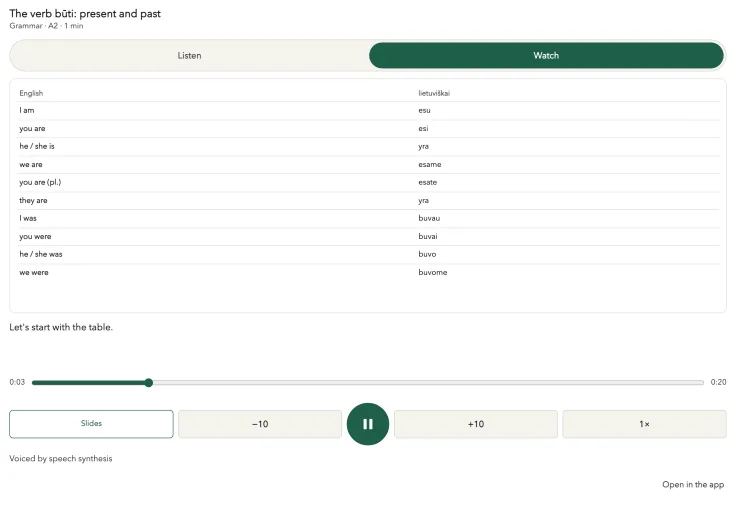
A grammar lesson from the Lithuanian course on our test setup, not a screenshot of a live chat. English lessons play in the same player.
Prompts for lessons
Grammar with slides
Make a five-minute B1 lesson on Present Perfect vs Past Simple, with a table, examples from work and a short exercise at the end.
Grammar always comes with slides: a table, the rule, an exercise.
Phrases for a situation
Make a lesson with phrases for meetings: run a meeting, meet a deadline, be on the same page, ask for feedback. Each phrase in a short example.
Before a specific event
I have a job interview on Thursday. Make a ten-minute lesson I can listen to on the way: work experience, strengths and weaknesses, job offer, and two ways to ask the interviewer a question at the end.
This is where a lesson built on request beats any library: the agent knows your profile and your words, and the lesson is about your Thursday, not about interviews in general.
A slow lesson for a beginner
An A1 lesson for my mum on ordering in a café: Table for two, please; Is this seat taken?; Could we have the bill, please? Slowly, with repeats.
At A1–A2 a lesson has 10 to 20 scenes, up to half of them explanations, and new phrases are slower and repeated. At B1–B2 more of the lesson is in English.
Lessons for the week
Prepare three short lessons for this week from my Job Search words. I'll listen on my commute.
Your weak spots
Make a lesson on my weak spots.
For this the agent builds a lesson on the topic of weak spots: it takes your mistakes from quizzes, the words you answer slowly (word_stats) and the corrections from your conversations.
Back to a lesson
Open yesterday's lesson here in the chat.
How to ask for a good lesson
The agent fills in the gaps itself, but four details make the lesson noticeably better:
- length: five minutes for a commute, fifteen for a walk;
- where you'll listen: if the screen will be off, say so, and ask for less that depends on slides;
- your words: “use phrases from my vocabulary” ties the lesson to what you are already reviewing;
- one topic: one tense or one situation per lesson is easier to remember than three.
Rules the agent follows
So that lessons don't pile up, the agent keeps no more than five unfinished lessons on one topic. It also doesn't hammer one problem word more often than once a week: a word that keeps failing comes back, but not in every lesson.
The explanations are voiced in English or in Russian, depending on the interface language; with an English interface you hear English. The English phrases are always in their own voice.
Limits
New voicing counts against the weekly Free limit of 210 new voicings. Phrases already voiced come from the cache and don't count again. If the limit runs out, a new lesson won't build until Monday, or with Pro.
A note on “offline”: there is no file to download. Offline here means the lesson is built without you, and you listen to it whenever you like in the app.
More guides are in the English guides; the product is on the Talkfirst home page.
Questions
Are there ready-made English lessons in Talkfirst?
No. English lessons are built by your agent on request. Ready-made lesson libraries exist for Polish and Lithuanian; for English you ask for exactly the lesson you need.
Can I download a lesson as an MP3?
No, there is no file to download. The lesson lives in the Lessons tab of the app, where you can listen with the screen off, watch with slides or read the text.
How long does it take to build a lesson?
A lesson of about eight scenes with new voicing takes roughly 15 seconds on the server. Voicing that is already in the cache is reused.
Will the lesson ask me questions?
No. A lesson plays from start to end without waiting for answers. Exercises appear on slides, and you practise out loud afterwards in a quiz, a pronunciation window or a conversation.