 Talkfirst
Short answer. Use the agent you already have, Claude or ChatGPT, as the tutor, and connect Talkfirst so that what you learn is kept: words go into a vocabulary with flashcards, phrases get a word-by-word pronunciation score, and the plan and progress are counted by the server. The agent thinks and explains; Talkfirst stores, listens and delivers.
An AI agent such as Claude or ChatGPT can be a good English tutor. It explains a tense in plain words, rephrases your sentence the way a colleague would say it, plays an interviewer or a landlord and adapts to your level. What it doesn't have on its own is a place to keep what you learn. This section is about the setup we think works best: your own agent plus Talkfirst as a connector.
We are not trying to be smarter than Claude. The agent thinks and explains. Talkfirst stores, listens and delivers: your vocabulary, voice recordings, feedback, progress and plan.
Why learn with an agent, and what it lacks
A chat answers at any hour and never tires of the same question. For spoken English for work and life that already covers a lot: rehearsing a job interview, finding the right phrase for an awkward email, understanding why one sentence sounds natural and another doesn't.
The gaps show up after a week. A new chat starts almost from scratch, and in a long chat the early messages drop out. Voice mode tries to understand you rather than grade you, so your pauses and the words it had to guess go unnoticed. There is no score for each word you say, and without rules in the prompt corrections are inconsistent. The full comparison is in plain chat vs agent with Talkfirst.
How to connect Talkfirst
Talkfirst is an MCP connector at https://mcp.talkfirst.io/mcp. In Claude, in the browser or the desktop app: Settings → Connectors → Add custom connector, paste the URL and sign in with an email code or Telegram. A new email creates a free account. In ChatGPT the connector is added through developer mode, if your plan and region have it.
Step-by-step setup and prompts for conversation practice are in English with ChatGPT and Claude; the current steps are always in the docs.
At the start of each session the agent reads what is due today, your profile, your notes, your plan and the help on the topic at hand. That is why a brand-new chat already knows your level, your goal, your words and what you agreed last time.
Six building blocks
1. Words go into your vocabulary
This is the main one. You give the agent a text, an email from a client or a description of your job, it picks the phrases worth learning and writes them into your vocabulary and flashcards. After that they come back on schedule, in quizzes and in conversations. More in English vocabulary with an AI agent.
2. Pronunciation with a score
A recording window opens right in the chat: you listen to the reference, say the phrase and get a score out of 100 for the whole phrase and for each word, plus what the recogniser heard. The agent then explains the one or two main problems. More in checking English pronunciation with AI.
3. Lessons the agent builds for you
Ask for a five-minute lesson on a tense, on phrases for meetings or on your own weak spots. The agent writes the script, the server voices and assembles it, and you listen later from your phone. English has no ready-made lesson library: lessons are built on request. More in AI audio lessons in English.
4. A study plan with real numbers
Your level, goal and deadline go into your profile, and the agent agrees a weekly plan with you: minutes of your own speech, quizzes, conversations, lessons. The server counts what you actually did, so the agent sees plan and fact in every new chat. More in an English study plan with AI.
5. An app where all of it lives
The web app and the Telegram Mini App share one account with the connector: the same vocabulary, flashcards and progress. Plan in Claude on the laptop, review and talk on the phone. More in an English learning app that works with your AI.
6. Which setup to choose
A plain chat, a chat with good prompts, or an agent with Talkfirst: what each gives you and where it stops. More in the best AI app to learn English. If you are choosing a speaking partner, see AI speaking partners compared.
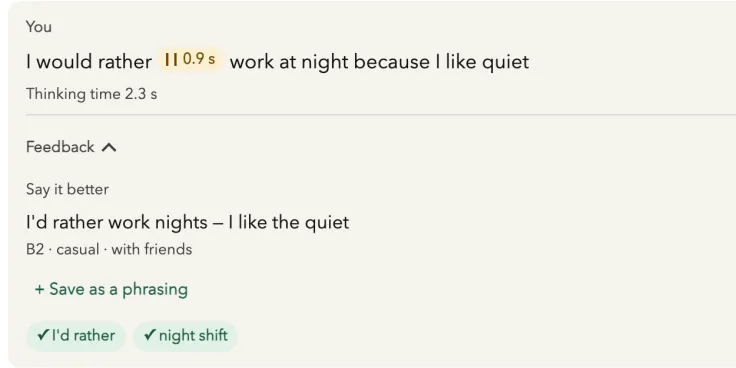
The Talkfirst conversation window after a reply. A frame from our test setup, not a screenshot of a live chat.
Your first session in 15 minutes
Connect Talkfirst, open a new chat and go through these steps. Change the level, goal and topic to your own.
Step 1. Profile and goal
My English is about B1. I need it for work: meetings and job interviews. I'd like to reach B2 by 1 June. Save this to my profile.
The agent fills in your level, goal, target level and deadline in profile and tells you what it saved.
Step 2. How you want to be taught
Remember this for every session: explain in English, keep it short, correct only mistakes that change the meaning, and give me one example from work.
Standing wishes go into your notes (notes_set, up to 2000 characters). The agent reads them at the start of every new chat and offers to save new ones when you mention them.
Step 3. First words
Show me the B1 topics. From Job Search, pick ten phrases I'll need in an interview and add them to my vocabulary.
The agent lists the course decks (topics) and writes phrases such as strengths and weaknesses, work experience and cover letter with vocab_add. Duplicates are skipped.
Step 4. Say one out loud
Give me a pronunciation window for “The interviewer asked about my strengths and weaknesses.”
The window opens in the chat in Claude on the web or the desktop app. Press Reference, record, and the agent explains the main mistake. In the Claude mobile apps connector windows have no microphone: record in the Talkfirst app instead.
Step 5. A plan for this week
I have about 15 minutes a day. Suggest a plan for this week: speaking minutes, quizzes and one conversation. Show it to me before you save it.
The agent proposes, you agree, and it writes the week with plan_set. From then on the server counts the fact, and next week the agent starts from it.
Learning Polish, Lithuanian or Czech?
The same approach works for the other Talkfirst courses, each with its own decks and details: Polish with an AI agent, Lithuanian with an AI agent and Czech with an AI agent. Your account is the same: switch the course and level in the app.
What it doesn't replace
Scores and corrections are automatic and can be wrong, and the voices are speech synthesis. It is a way to get a lot of practice and keep it organised, not a teacher who builds your pronunciation from scratch. Other guides are in the English guides, and the product itself is on the Talkfirst home page.
Questions
Do I need a paid Claude or ChatGPT plan?
Claude and ChatGPT have free plans with their own limits. In ChatGPT the connector needs developer mode, and whether you have it depends on your plan and region. Without the agent, everything in Talkfirst also works in the browser and in Telegram.
How much does Talkfirst cost?
Free includes 35 voice minutes a week (recognising your speech and voicing answers), 210 new voicings a week and the starter scenes: Meeting someone, At a café, Asking the way. Pro gives 140 voice minutes a week, all scenes, including a job interview, and your own topic, for 500 Telegram Stars for 30 days. Limits reset on Monday.
Will the agent remember me in a new chat?
Yes, through Talkfirst. At the start of a session it reads your profile, notes, plan and what is due today, so it knows your level, goal, words and agreements without you pasting anything.
Can I practise speaking in the Claude mobile app?
The text tools work there, but connector windows in the Claude mobile apps have no microphone. For voice, open the Talkfirst app in the browser or in Telegram; the results go into the same account, and the agent sees them.