 Talkfirst
Short answer. Ask the agent to pick phrases from your text, conversation or job and save them with the Talkfirst connector: each entry goes into your vocabulary and flashcards at once, with a translation and an example. Then the words come back through spaced repetition and quizzes, and in any new chat the agent knows what is due today.
Words are where learning with an agent most often leaks. ChatGPT or Claude gives you a great list of twelve phrases for a job interview, you nod, close the chat, and a week later the list is somewhere in your history. That's why people search for “chatgpt flashcards” and copy lists into Anki by hand. With Talkfirst connected, the agent writes the words straight into your vocabulary, and they come back on their own.
How to connect the connector is in the section overview. Here we go through the vocabulary block in detail.
What happens when the agent saves a word
The agent calls vocab_add with up to 200 entries at a time. Each entry has the term in English, its meaning in the language you learn in (English, Russian or Ukrainian), an example, a level and a kind. One call writes to both your vocabulary and your flashcards; duplicates are skipped, so you can safely ask twice.
There are two kinds of entries, and the difference matters:
- A chunk is a word or an expression of up to about five words: landlord, apply for a job, meet a deadline. Chunks go into flashcards and quizzes.
- A formulation is a whole ready-made sentence: Let me check with my team and get back to you. Formulations don't go into quizzes. Instead, the conversation partner in your voice practice creates a reason for you to say them.
The agent reads the rules in the help on vocabulary before it writes anything. One entry is one word in its dictionary form or one whole phrase. The form you actually used goes into the example: you said I applied for a job at that company, and the entry becomes apply for a job with your sentence as the example. A list such as “boss, colleague, salary” is split into three entries. A grammar rule is not an entry: that belongs in a lesson.
Where the words come from
From your own text or situation
The most useful words are the ones you need this week. Paste an email, a job ad or a description of your day and let the agent choose.
Here is an email from my manager. Pick the phrases worth learning at B1 and add them to my vocabulary, with an example from the email for each.
I start a new job in a team next month. Add ten phrases I'll need in the first week, like ask for feedback or run a meeting.
From the feedback after a conversation
After a voice conversation in Talkfirst you get corrections, a better way to say what you meant and new words. Each line has a “+” button that adds it to your vocabulary, and a whole “Say it better” sentence can be saved as a formulation.
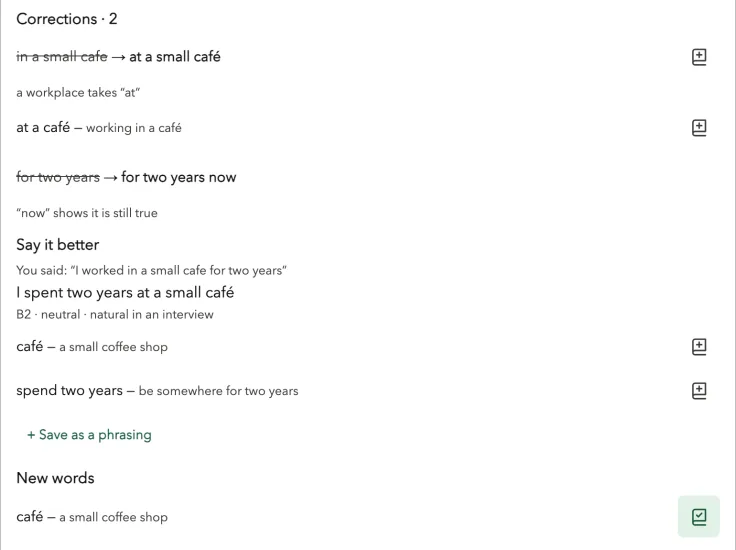
Feedback after a conversation: corrections, “Say it better” and new words, each with a button to save it. A frame from our test setup, not a screenshot of a live chat.
From the course decks
Talkfirst has English decks by topic from A1 to C1: from At a Café and Directions to Job Search, Negotiating and Formal Emails. The agent sees them through topics.
Show me the B1 topics. From Work & Colleagues, add the phrases I don't know yet.
Save these as whole phrasings, not as quiz cards: “Let me check with my team and get back to you.” and “I see what you mean, but I still disagree.”
The app itself has no “add your own word” button: your own words get in through the agent or from conversation feedback. In the app the vocabulary is on the Vocabulary tab, and you can remove a word there.
How words come back
Saved words enter spaced repetition. The agent sees which cards are due (srs_due) and records your answers (srs_review), so the schedule follows your answers rather than a list you keep by hand.
Quizzes (quiz_start) come in several types: recognise (from English to the meaning), recall (from the meaning to English), listening, saying the phrase out loud, and “say it in English”, where you see only the meaning and answer by voice from memory. The source can be the words due for review, your weak words, new ones, a topic or an exact list.
Quiz me on the words due today: show the meaning, I say it in English.
Repeat that quiz with only the ones I got wrong, and save it as “interview phrases”.
The first is a “say it in English” quiz; the second uses only_wrong and quiz_save, and saved quizzes are listed by quizzes. If you are not sure of your level at all, ask for a placement check first.
Keeping the vocabulary honest
A vocabulary is only useful if it reflects what you really know. The agent has tools for that:
- Postpone a card for later (
defer_card) or never study it (skip_card). - Already know it (
mark_known) at one of five levels: I recognise it, I recall it, I get it by ear, I pronounce it, I use it. - Calibrate (
calibrate): go through a list together and mark what you already know. - Word stats (
word_stats): the status of a word, each skill from 0 to 2 and your median response time per skill. A slow answer is a reason to talk, not a verdict. - Filtered lists (
vocab_list), for example the words you don't yet recall confidently.
I already know café, menu and bill. Mark them as known so they don't take up my reviews.
Which words do I still not recall confidently? And how am I doing with meet a deadline?
If reviews start to feel like pressure, switch the app from Strict or Mix to Zen, the mode without pressure.
Questions
Can ChatGPT make flashcards for Anki?
It can write a list you then import by hand, and you have to repeat that after every session. With the Talkfirst connector the agent writes words straight into flashcards with spaced repetition, and they are the same in the chat, in the browser and in Telegram.
Should I save single words or whole phrases?
Mostly short phrases of up to about five words, such as apply for a job: they go into flashcards and quizzes. Save a whole sentence as a formulation when you want to be able to say it in one go; it won't be quizzed, and the conversation partner will give you a reason to use it.
Can I add a word in the app without the agent?
There is no button for that. Your own words get in through the agent or with the plus buttons in conversation feedback. In the app you can see the whole vocabulary and remove a word.
What language are the translations in?
In the language you learn in: English, Russian or Ukrainian. The term itself is always English.