 Talkfirst
Short answer. Talkfirst is a web app and a Telegram Mini App with one account shared with the connector in Claude and ChatGPT: the same vocabulary, flashcards, plan and progress everywhere. In the app you review words, take quizzes, have voice conversations with feedback and listen to lessons; in the chat the agent sees those results and plans what comes next.
An AI agent is at its best when you sit at a laptop and think: going through an email, planning the week, asking why a phrase sounds wrong. But most English practice happens in small gaps: five minutes on the bus, a walk, the evening on the sofa. That needs an app on your phone, and that app has to know what you did in the chat.
This page is about that app. The rest of the method is in the section overview.
One app, two doors
Talkfirst runs in the browser at app.talkfirst.io and as a Mini App inside Telegram, through the bot @any_lang_learn_bot. It is the same app, and it shares one account with the connector in Claude and ChatGPT. You sign in with an email code or with Telegram; a new email creates a free account.
So there is nothing to sync and nothing to export. A word the agent saved in Claude an hour ago is already in your flashcards on the phone, and a quiz you took in Telegram is already in the progress the agent reads.
What's inside
The app has five tabs: Today, Talks, Quizzes, Lessons and Vocabulary.
- Today: words of the day with a ▶ button to hear them, a link to All vocabulary, an invitation to “Check what you know” if you already know some of the words, and the pace card when you have a goal and a deadline.
- Talks: voice conversations in scenes, with feedback afterwards: pauses, corrections, a better way to say it and new words.
- Quizzes: recognising, recalling, listening and saying words out loud.
- Lessons: the lessons your agent built for you, to listen to, watch or read.
- Vocabulary: everything you've saved; you can remove a word here.
In the app you switch the course, language and level, and the mode: Strict, Zen or Mix, where Zen is the one without pressure. The interface and explanations are in English, Russian or Ukrainian. English has no mock exams in Talkfirst.
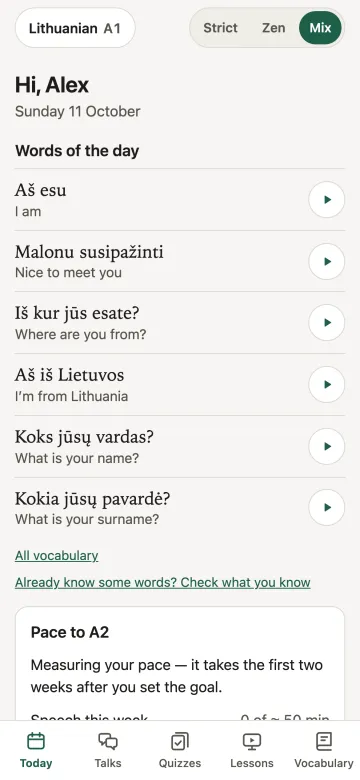
The Today screen of the app in Telegram, English interface, here on the Lithuanian course; on the English course the screen is the same with English words.
Words of the day and “Check what you know”
If you start at B1, the first decks are full of words you already know. Reviewing them is a waste of time, so the Today screen invites you to check what you know: you go through the words and mark the familiar ones, and they stop taking up your reviews. The agent can do the same in the chat with calibrate.
When a level starts to feel easy, the course switch in the app moves you to the next one, for example from B1 to B2, with that level's decks.
What's on my Today list? Let's go through it together and mark what I already know.
Scenes for conversations
Free includes the starter scenes: Meeting someone, At a café and Asking the way. Pro opens all scenes, including a job interview, and lets you set your own topic. In a conversation you speak, the partner answers by voice, and afterwards you see where you paused, what to correct and how to say it more naturally. How it compares with other speaking partners is in AI speaking partners compared.
Why voice goes through the app
In Claude on the web and the desktop app the pronunciation and conversation windows open right in the chat. In the Claude mobile apps connector windows have no microphone. The text tools still work there, and voice practice moves to the Talkfirst app in the browser or Telegram. The results land in the same account, and the agent sees them.
A week with both
A setup that works for many people:
- In Claude on the laptop: go through a conversation, save new words, agree the plan, ask for lessons for the week.
- In Telegram on the phone: review flashcards, take a quiz on the commute, have a conversation in the evening, listen to a lesson on a walk.
All of it goes into one vocabulary and one progress record.
Prompts that connect the chat and the app
I had a conversation in the app this morning. Look at the feedback and add the corrections to my vocabulary.
The agent reads the conversation result (dialogue_result) and saves what you agree on with vocab_add.
What did I get wrong in the quiz I took on my phone?
The agent opens the quiz result (quiz_result) and can suggest a repeat with only the mistakes.
Prepare two lessons I can listen to in Telegram tonight: one on phrases for phone calls, one on my weak spots.
I recorded the phrase in the app. Done.
When you write “done” after recording in the app, the agent takes the result from your progress.
What did I do this week across the chat and the app?
Plans and payment
Free: 35 voice minutes a week (recognising your speech and voicing answers), 210 new voicings a week and the starter scenes. Pro: 140 voice minutes a week, all scenes and your own topic, for 500 Telegram Stars for 30 days. Payment is in Telegram Stars only for now. Limits reset on Monday. More in the English guides and on the Talkfirst home page.
Questions
Do I need Claude or ChatGPT to use the app?
No. Vocabulary from the course decks, quizzes, conversations and lessons you've already got work in the app on their own. The agent adds what an app can't: explaining, picking your words, building lessons and agreeing the plan.
Is the Telegram app the same as the web app?
Yes. It's one app and one account: the same vocabulary, flashcards, plan and progress in the browser and in Telegram.
Can I pay by card?
Not yet. Pro is paid in Telegram Stars: 500 Stars for 30 days.
Which interface languages are there?
English, Russian and Ukrainian, and the explanations follow the interface language. The one exception is the voice in lessons: explanations there are voiced in English or Russian, so with a Ukrainian interface they sound in Russian for now.