 Talkfirst
Short answer. ChatGPT and Claude both have free plans and are good partners for spoken English, and a prompt with clear rules keeps their corrections consistent. A plain chat lacks spaced repetition, a pronunciation score and a record of your progress; add them yourself or with a connector such as Talkfirst.
You can learn English with ChatGPT or Claude, and for free too: both assistants speak English well, explain patiently and never get tired of the same question. But a plain chat is a conversation partner, not a course. Below: what it does well, where it falls short, prompts you can copy, and how to add what it's missing.
What an AI chat does well
- Conversation on any topic. A job interview, a chat with a neighbour, a complaint in a shop — the assistant plays any role and adjusts to your level.
- Explanations. Why it's Present Perfect here, how make differs from do, how to say it more politely — with examples and in plain words.
- Natural phrasing. You write it the way you'd say it, and the assistant shows how a native speaker would put it, from neutral to casual.
- Voice. ChatGPT and the Claude apps have a voice mode, so you can talk out loud instead of typing. For spoken English that's the point.
Where a plain chat falls short
No spaced repetition
A word you met in a conversation needs to come back after a day, after three days, after a week — otherwise it fades. The chat doesn't do that on its own: it won't remind you tomorrow and doesn't know which words are due. That's why people search for “chatgpt anki”, ask for flashcards and then move them into a separate app.
No pronunciation score
Voice mode tries to understand you, not to grade you. It's built to follow accented speech, and that is exactly why it may not notice that the “th” in think came out as “s” or “f”. There is no word-by-word score like in a pronunciation trainer, and “great pronunciation” from the assistant measures nothing.
No record of your progress
ChatGPT and Claude have memory, but it holds notes about you, not a log: which words you learned, when you reviewed them, where you make mistakes most. A new chat starts almost from scratch, and in a long chat the early messages drop out.
Corrections are inconsistent
Without clear rules the assistant either corrects every small thing and breaks the flow, or corrects nothing so as not to interrupt. A prompt fixes that — ready-made ones below.
Prompts that work
Copy them and change the level, topic and role. The more specific the rules, the steadier the session.
A partner who doesn't interrupt
You are my English conversation partner. My level is B1. Topic: a job interview at a café, you are the manager. Ask one question at a time and wait for my answer. Use short sentences. Don't correct me during the conversation. After 10 of my replies, list: what I said → the correct version → why, plus 5 phrases from the conversation worth learning.
Say it more naturally
I'll write sentences in English the way I'd say them. For each one give: 1) a corrected version if there is a mistake; 2) how a native speaker would say it in conversation; 3) one sentence on what the difference is. No long lectures.
Phrases, not single words
Give me 12 ready-made A2 phrases for renting a flat: questions to ask the landlord and answers to the landlord's questions. Format: phrase — short explanation. Only things people actually say.
Manual review
Here are the words I'm learning: … Quiz me: show the meaning, I say the phrase in English. Repeat the ones I get wrong at the end.
You'll have to keep the word list yourself and paste it at the start of each session: the chat won't keep it in a usable form.
Voice mode
Speak slowly and in simple sentences. If I pause, wait — don't finish my sentence for me. If you didn't understand me, ask me to repeat instead of guessing.
The last request matters: when the assistant guesses what you meant, you never learn that you were hard to understand.
What Talkfirst adds to the chat
Talkfirst works in Claude and ChatGPT as a connector (an MCP server). The assistant stays the same conversation partner, and it gets tools:
- A pronunciation window. Say a phrase and get a word-by-word score from speech recognition. In recall mode you see only the meaning and say the phrase from memory.
- Voice conversations with feedback. A scene (free: a café, asking the way; in Pro: a job interview and more) or, in Pro, your own topic; afterwards — pauses, corrections and more natural ways to say it.
- Flashcards with spaced repetition. Words from a conversation go into your vocabulary and flashcards, and the assistant knows what to review today.
- Quizzes on your words — recognition, recall, listening and speaking.
- One progress record. Vocabulary, flashcards and stats are the same in the chat, in the web app and in the Telegram bot: start in Claude, review on your phone.
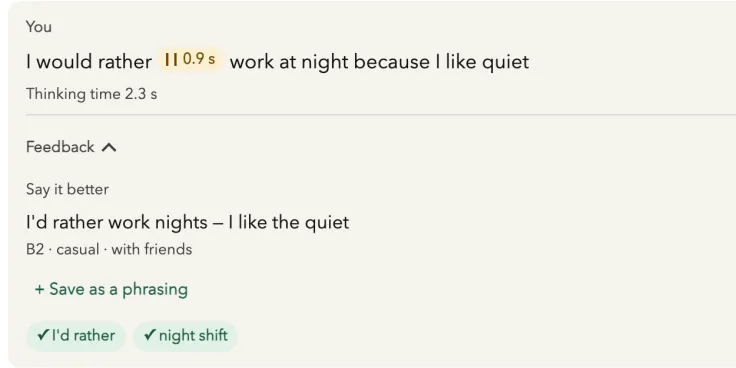
The Talkfirst conversation window after a reply: the pause, a “say it better” version and target phrases. A frame from our test setup, not a screenshot of a live chat.
Each of these is unpacked step by step, with prompts, in the section how to learn English with an AI agent: words into your vocabulary, pronunciation, lectures from the agent, a study plan and the app where it all lives.
How to connect it
Claude
- Open Claude in the browser or in the desktop app.
- Settings → Connectors → Add custom connector.
- URL:
https://mcp.talkfirst.io/mcp. - When asked, sign in with an email code or Telegram. A new email creates a free account.
- Type in the chat: “Help me practise pronouncing a useful phrase for today.”
Voice windows work in Claude on the web and in the desktop app. In the Claude mobile apps connector windows have no microphone: the text tools still work there, and voice practice continues in the Talkfirst app.
ChatGPT
- Turn on developer mode: Settings → Apps → Advanced settings.
- Create an app with the URL
https://mcp.talkfirst.io/mcpand OAuth sign-in. - Sign in to Talkfirst the same way — with an email code or Telegram.
Whether developer mode is available depends on your ChatGPT plan and region. If you don't see it, Talkfirst works in Claude, in the browser and in Telegram. Current steps are in the docs.
What Talkfirst doesn't replace
The voices in the windows are synthesised, and scores and corrections are automatic and can be wrong. It's a trainer for lots of practice, not a teacher who fixes your pronunciation from scratch. More in the English guides.
Questions
Can I learn English with ChatGPT alone?
For talking and going through mistakes — yes, it does that well. But without scheduled review words fade, and without a pronunciation score mistakes in sounds stick. Those parts need adding: keep a word list yourself or add a connector with flashcards and a pronunciation window.
Is it free?
ChatGPT and Claude have free plans with their own limits. The Talkfirst free plan includes 35 voice minutes a week (recognising your speech and voicing answers) and the starter scenes. More minutes, all scenes and your own topics are in Pro.
Which is better for English — ChatGPT or Claude?
Both speak English well. For Talkfirst the difference is practical: the connector's voice windows work in Claude on the web and on desktop; in ChatGPT the connector is added through developer mode, if your plan and region have it.
Will the assistant remember my words between chats?
Not on its own, not as a list with review dates. With the Talkfirst connector your words live in your account, and in any new chat the assistant sees what to review today.