 Talkfirst
Short answer. A plain AI chat can't tell you how well you pronounced a phrase: voice mode is built to understand accented speech, not to score it. With the Talkfirst connector the agent opens a recording window in the chat, and you get a score out of 100 for the phrase and for each word, what the recogniser heard and your reaction time; the agent then explains the main mistakes.
Ask ChatGPT in voice mode how your pronunciation is and you'll probably hear that it's great. That isn't flattery, it's how voice mode works: it tries to understand you, not to grade you. It answers the meaning it understood and doesn't show the pauses, the hesitations or the words it had to guess. So mistakes in sounds and long pauses before hard words stay unnoticed.
This page is about giving your agent a measurement it can work with. How to connect Talkfirst is in the section overview.
The pronunciation window
The agent opens it with practice_phrase, right in the chat in Claude on the web or the desktop app. There are three ways to call it:
- without arguments: the next phrase from your deck;
- with any text: the phrase you want, from your job, a presentation or a film;
- with a card from your vocabulary.
In the window there is a Reference button that plays how the phrase should sound, and a record button. You listen, say it and wait a second.
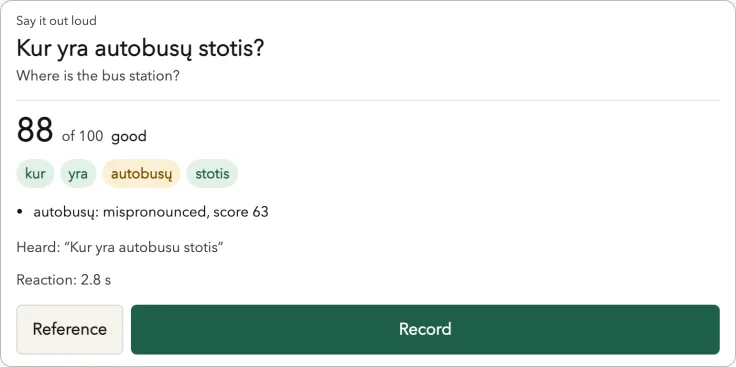
A frame from the Lithuanian course on our test setup, not a screenshot of a live chat. The window is the same for English.
What the score tells you
After the recording you see:
- an overall score out of 100;
- a score for each word, with the word highlighted if it was inaccurate, for example “mispronounced, score 63”;
- Heard: what the recogniser actually heard;
- your reaction time: how long it took you to start.
Be clear about what this is. The score comes from speech recognition at the level of words. It is not an analysis of individual sounds or of intonation. If think comes out close to another word, that word gets a low score and Heard shows what was recognised, but the window doesn't name the sound. Scores are automatic and can be wrong, and the reference voice is speech synthesis.
The agent then looks at the result and explains the one or two main problems in words, in the language you learn in. It doesn't go through everything at once. If no English speech was recognised, there is no score: the agent asks you to record again.
Prompts for pronunciation
Give me a pronunciation window for “Thank you very much for your help.”
Next phrase from my deck, please. After each attempt tell me only the one thing to fix.
I have a call with a client tomorrow. Let me practise “Let me check with my team and get back to you.” until the score is above 85.
The threshold is yours to choose; the agent just keeps opening the window and comparing scores. If you want it to always work this way, ask it to save the rule in your notes.
Recall mode: say it from memory
Reading a phrase aloud and producing it yourself are different skills. In recall mode (recall=true) the window shows only the meaning. You say the English phrase from memory, and the original appears after the recording. After such an attempt the agent counts the flashcard as reviewed (srs_review with the suggested grade), so a speaking attempt moves your review schedule just like a quiz answer.
Recall mode for my cards due today: show me the meaning, I'll say the phrase from memory.
For several phrases in a row there is a speaking quiz, quiz_start(type="say"). At the end you see for each phrase whether it was recognised, the score, your reaction time and a hint when a phrase can be marked as known.
Do a speaking quiz on five phrases from Phone Calls: Can I take a message?, hold on a second, call someone back, speak up, see you then.
Pauses: where you stop to think
In voice conversations Talkfirst gets the timing of every word from recognition. A gap of 0.4 seconds or more between words is recorded, together with the word it came before, and so is the “thinking time” before your first word.
This is where the agent sees what a plain chat can't. If you often stop before responsibility or before the second half of work-life balance, those words appear in the summary of pauses that the agent reads at the start of the day, and the conversation partner weaves them into your next conversations.
Which words do I pause before most often? Build them into our next conversation.
More about speaking practice itself is in how to start speaking English.
On the phone
In the Claude mobile apps connector windows have no microphone. The text tools still work, and the pronunciation window itself offers “Open in browser”. Record in the Talkfirst app, in the browser or in Telegram, then come back to the chat and write “done”: the agent takes the result from your progress.
I recorded “Can you speak up? I can't hear you.” in the app. Done. What went wrong?
What it doesn't replace
A word-level score is a measurement you can repeat every day, which is more than voice mode gives you. It is not a phonetics teacher. If a specific sound keeps failing, a teacher who hears you is still the fastest fix. Other guides are in the English guides; the product is on the Talkfirst home page.
Questions
Can ChatGPT check my English pronunciation?
It can tell you whether it understood you, and that's useful. But voice mode is built to understand accented speech, so it doesn't give a score for each word and may not notice a wrong sound. With the Talkfirst connector the agent gets a word-by-word score to work with.
Does the score check individual sounds and intonation?
No. It is a score from speech recognition at the level of words: which words were recognised and how confidently. It doesn't break a word into sounds and doesn't grade intonation.
How many recordings can I make for free?
Free includes 35 voice minutes a week, which covers recognising your speech and voicing answers. Pro has 140 minutes a week. Limits reset on Monday.
What if the window says nothing was recognised?
Then there is no score. Check the microphone, move closer and record again; the agent will ask you to do the same.