 Talkfirst
Short answer. With the Talkfirst connector, Claude or ChatGPT can turn a request like “a short lesson about the doctor's visit” into an audio lesson: the agent writes the script, the server builds it in the background, and Czech phrases are voiced separately in a Czech voice. You listen in the chat or later in the Lessons tab of the app, with sound only, with slides or as text. Talkfirst has no ready-made library of Czech lessons yet, so the agent builds each one on request.
Textbooks teach Czech in the order the textbook wants. Life asks in a different order: this week it is a visit to the GP, next week a flat viewing. An AI agent can explain any of it, but a long explanation in a chat is something you read once at a desk. A short audio lesson is something you can listen to twice on the tram.
With the Talkfirst connector the agent can build such lessons for you. For Czech this is the main way to get lessons: there is no ready-made library for the Czech course, so each lesson is built by the agent on request. Setup is in the main guide to Czech with an AI agent.
How a lesson is built
You ask: “Make a short lesson about …”. The agent reads the Talkfirst docs on lessons and writes a script made of scenes:
- explanations in the language you learn in;
- Czech phrases as separate scenes, in a Czech voice;
- slides, tables and exercises where they help.
Then it calls lesson_create. The lesson is built on the server in the background, not in the chat. A lesson of about eight scenes with new voicing takes roughly 15 seconds; anything already voiced comes from the cache. If the script has a mistake, the agent sees it straight away and fixes it.
Where you listen
The lesson opens as a window in the chat (lesson_open) and also appears in the Lessons tab of the Talkfirst app, in the browser and in Telegram. So you can ask the agent in the evening to prepare three lessons for the week and listen to them later on your phone.
One lesson, three ways to take it:
- Listen — sound only, the screen can be off: on a walk, on the tram.
- Watch — with slides or subtitles.
- Read — text without sound, with ▶ next to each phrase.
There is a speed control and ±10 seconds. A lesson is not interactive: it does not wait for your answer. For speaking, use a conversation or the pronunciation window.
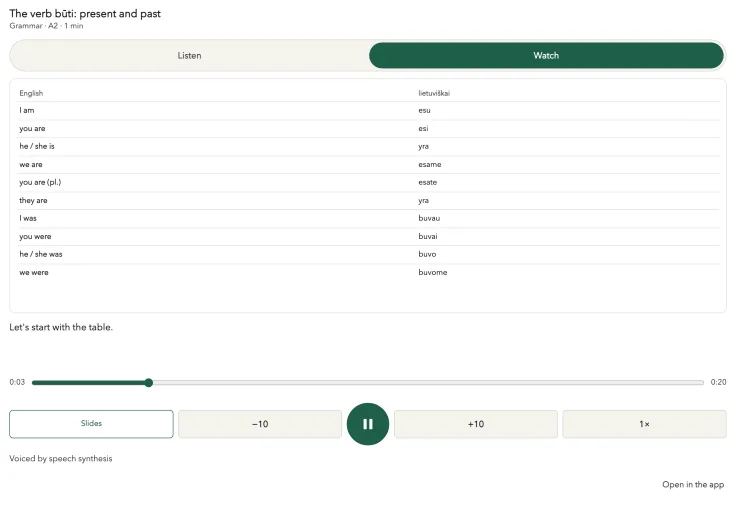
The lesson player with a Lithuanian grammar lesson. A frame from our test setup, not a screenshot of a live chat; Czech lessons play in the same player.
Prompts for Czech lessons
Before a real situation
I have a GP appointment on Thursday. Make a 5-minute A2 lesson: how to say what hurts and understand the doctor's questions. Use phrases from my doctor's deck.
Expect phrases such as Co vás bolí? (What hurts?), Bolí mě tady (It hurts here) and Užívám léky na tlak (I take blood pressure pills) as separate Czech scenes.
Grammar with slides
Make a short lesson on the Czech past tense at A2: when you need “jsem” and when you don't. A table on a slide and a short exercise at the end.
Grammar lessons always come with slides: a table, the rule, an exercise. You will want Watch mode for this one.
False friends
A lesson on Czech false friends for Slavic speakers: “čerstvý”, “pozor”, “úžasný”, “život”. Each with an example sentence.
The examples can be sentences like Tento chléb je čerstvý. (This bread is fresh.)
Your weak spots
Make a lesson from my weak spots: mistakes from my quizzes, the words I answer slowly and corrections from my conversations.
This is the weak_spots topic. The agent takes quiz mistakes, slow words from word_stats and corrections from conversations.
A week of listening
Prepare three lessons for this week on renting a flat: calling about an advert, the viewing, the contract. I'll listen on my way to work.
After the lesson
A lesson is input; the words still have to get into your mouth and into your flashcards. Right after listening, go back to the chat:
I finished the doctor's lesson. Save the five most useful phrases from it to my vocabulary, then quiz me on exactly those five, out loud.
The agent saves the phrases with vocab_add and starts a quiz on that exact list of terms. A finished lesson also counts towards your weekly plan, next to speaking minutes, quizzes and conversations, so the agent sees it in the next chat.
Which lessons have I not finished yet? Don't make new ones on that topic until I do.
What the agent keeps in mind
- Size by level. At A1–A2 a lesson has 10–20 scenes, explanations take up to half, and new phrases are slower and repeated. At higher levels more of it is in Czech.
- Not too many at once. The agent keeps up to five unfinished lessons per topic.
- No nagging. It does not bring the same problem word into a lesson more than once a week.
Voices and limits
Explanations are voiced in Russian or English, following your interface language; with an English interface they are in English. Czech phrases have their own Czech voice. All voices are speech synthesis.
New voicing counts towards the weekly limit: Free includes 210 new voicings a week. If they run out, a new lesson won't build until Monday, or with Pro. Anything already voiced plays from the cache.
There is no file to download. “Offline” here means the lesson is built without you and you listen later, in the app.
More on the other blocks: a Czech study plan with AI, Czech vocabulary with an AI agent. All guides: Czech guides. About the course: Talkfirst for Czech.
Questions
Are there ready-made Czech lessons in Talkfirst?
Not yet. Ready-made lesson libraries exist for Polish and Lithuanian; for Czech the agent builds each lesson on request, and the lesson script supports Czech.
Can I download a lesson?
No, there is no download file. Lessons live in the Lessons tab of the app, and you can listen with the screen off.
Does the lesson check my answers?
No, a lesson does not wait for an answer. To speak and get feedback, use a voice conversation or the pronunciation window.
How long does a lesson take to build?
A lesson of about eight scenes with new voicing builds in roughly 15 seconds on the server. Already voiced phrases come from the cache.