 Talkfirst
Short answer. A plain ChatGPT or Claude does not grade your Czech pronunciation: voice mode tries to understand you, not to score you. With the Talkfirst connector, Claude on the web or desktop opens a recording window in the chat: you say a Czech phrase and get an overall score out of 100, a score for every word and what speech recognition heard. It is a word-level score from speech recognition, not an analysis of individual sounds or intonation.
Czech reads almost the way it is written, and the stress is always on the first syllable. What trips people up is elsewhere: long vowels marked with a stroke, ř, clusters of consonants. You can read about them for hours. What helps is saying a phrase, seeing which word did not come through and saying it again.
A plain AI chat cannot do the second part. Its voice mode is built to understand you even with an accent, so it rarely tells you that a word came out wrong. This page shows how the Talkfirst connector adds a pronunciation check to the chat, and where its limits are. Setup is in the main guide to Czech with an AI agent.
The pronunciation window in the chat
With Talkfirst connected, the agent can open a recording window right in the chat with practice_phrase. This works in Claude on the web and in the desktop app. There are three ways to start it:
- with no phrase — the window takes the next phrase from your deck;
- with any text — for example, a sentence you need tomorrow;
- with a flashcard — a word or phrase from your vocabulary.
In the window there is a Reference button that plays the phrase, and a Record button. Listen, record, get the result.
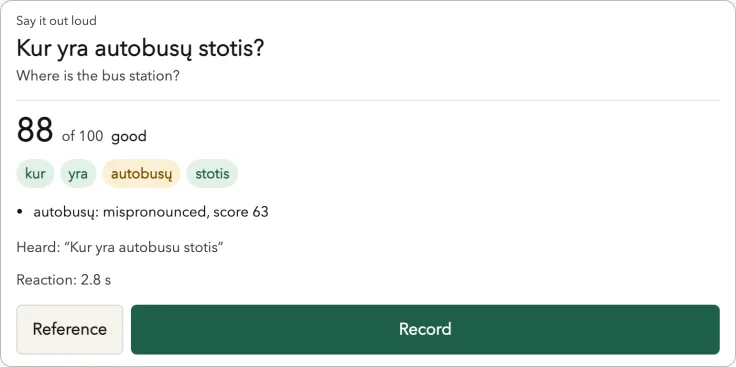
The pronunciation window on the Lithuanian course. A frame from our test setup, not a screenshot of a live chat; the window is the same for Czech.
What the score shows
- An overall score out of 100 for the phrase.
- A score for every word. A word that did not come through is highlighted as mispronounced, with its own score.
- Heard — what speech recognition actually recognised. If a long vowel or ř came out differently, the word may get a lower score or show up differently here.
- Reaction time — how long it took you to start speaking.
After the attempt the agent explains the one or two main mistakes in plain English. If your Czech was not recognised at all, there is no score, and the agent asks you to record again.
Be clear about what this is: a word-level score from speech recognition. It does not analyse individual sounds or intonation, and it will not tell you how exactly to place your tongue for ř. Scores are automatic and can be wrong, and the reference voices are speech synthesis. Use the score to find the word that needs work, then compare your recording with Reference.
Prompts for Czech pronunciation
A phrase you need
Give me a pronunciation window for “Můžete mi to ukázat na mapě?” — I'm not sure about the long vowel in the middle.
The agent opens practice_phrase with your text. After the recording it tells you which words scored low and what to try next.
The ř drill
Let's practise ř. Give me three short phrases from my deck with ř, one window at a time: start with “Na křižovatce je banka.”
Phrases like Jděte k přepážce číslo pět. (Go to counter number five.) are in the A1 and A2 decks. Watch how the score for the word with ř changes from attempt to attempt.
Your deck, phrase by phrase
Pronunciation practice: take the next phrases from my deck, one window at a time. Stop after five and tell me which word was weakest.
From memory
Do my due flashcards in recall mode: show me only the English, I'll say the Czech.
In recall mode (recall=true) the window shows only the translation. You say the phrase from memory, and the original opens after the recording. After such an attempt the agent grades the flashcard with srs_review, using the suggested grade, so speaking counts as a review.
A short spoken quiz
Quiz me on five phrases from the pharmacy topic: you show the meaning, I say it in Czech.
That is quiz_start(type="say"). At the end you see, for each phrase, whether it was recognised, its score, your reaction time and a hint when you can mark it as known. Phrases like Bolí mě v krku (I have a sore throat) are in that deck.
Pauses in conversation
A single phrase is one thing; a conversation is another. In Talkfirst voice conversations, speech recognition returns the time of every word. A pause of 0.4 seconds or longer between words is recorded, together with the word it came before, and so is the “thinking time” before your first word.
Words you often hesitate before end up in pauses_summary in today(), and the conversation partner weaves them into your next conversations. This matters for the Czech A2 exam: in the speaking part there is no preparation time, so hesitation costs you. More in the A2 speaking part and in the Czech A2 exam guide.
Which words do I usually pause before? Let's do a short conversation that uses them.
On your phone
In the Claude mobile apps connector windows have no microphone. The text tools still work there, but record in the Talkfirst app in the browser or in Telegram; the window itself offers “Open in browser”. When you have recorded in the app, write “done” in the chat, and the agent picks up the result from progress.
More about learning words: Czech vocabulary with an AI agent. All guides: Czech guides. About the course: Talkfirst for Czech.
Questions
Can AI check hard Czech sounds?
Not as a separate sound grade. The Talkfirst window scores every word from speech recognition, so a word where ř came out wrong may score lower or be heard differently. Listen to Reference and compare; for detailed work on one sound, a tutor who hears you is still better.
Does ChatGPT voice mode check pronunciation?
It is built to understand you, not to grade you. It answers what it understood and does not show the words it had to guess, so mistakes in sounds and pauses often go unnoticed.
Does the Czech A2 mock exam score pronunciation?
No. The mock speaking part in Talkfirst (beta) scores the tasks, not pronunciation. For pronunciation, use the window described above.